Organization
Role
Year
Modality
Newfold Digital
(formerly Endurance International Group)
Instructional Designer
2019
Materials
Situation
Web hosting is a complex subject, and facilitators needed a clear, reliable source of truth to help keep multi-week classes organized, on schedule, and aligned, without missing key content along the way.
Task
Create a facilitator guide (FG) that supports instructors with clear structure, quick reference points, and usability during live delivery, while also making the guide easy for the instructional designer to update.
Action
I developed a modular FG using color-coordinated instruction blocks and symbols to make important information quickly scanable. I aligned each block to corresponding participant materials, making content updates more efficient. I also included guidance on slide displays, pacing, transitions, and on-the-fly classroom management — such as activities, prompts, and contingency (“If/Then”) steps — so facilitators can maintain learner engagement and stay on track even amidst interruptions.
Result
The resulting FG enables facilitators to easily reference the next steps while leading a session, reduces cognitive load during delivery, and aligns tightly with participant materials. Facilitators were generous in their feedback, and after just one pilot course we were ready to launch. After 2 onboarding classes, facilitators reported that they were able to focus more on their learners, and less on classroom setup and timing.
Learned
This project became a valuable learning experience for the entire training team. As facilitators collaborated with me, they gained confidence in their classroom management abilities and identified that clarity, effective time management, and flexibility were the areas where structured support made the greatest impact.
Project Walkthrough: Facilitator's Guide
Project Write-Up: Facilitator's Guide
This Facilitator Guide (FG) was intentionally designed with scanability in mind. While facilitators review the content ahead of time, teaching in real time means they also need to manage the room, respond to learners, and keep the class moving. The structure of the FG allows facilitators to quickly orient themselves, identify next steps, and maintain momentum without disrupting the flow of the session.
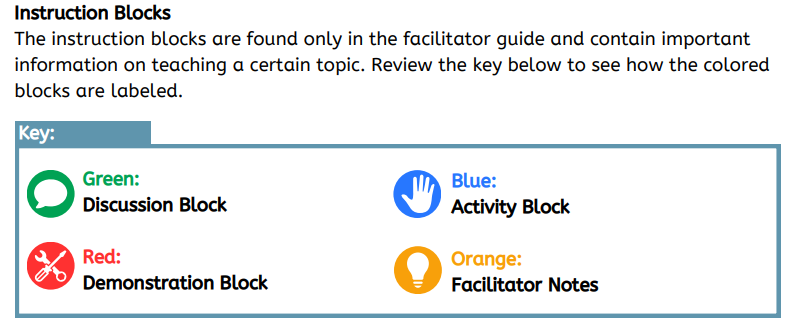
To support facilitators as they quickly glance at the guide, I’ve used clear instruction blocks that are color-coordinated and paired with simple symbols. This makes the guide more accessible, including for facilitators with color-vision differences. The modular format had a secondary effect of making it easier to update: As an example, anything in the “Orange” Facilitator notes does not appear in the corresponding Participant Guide (PG), which makes it easy to know when an update affects facilitators only.
The FG also shows what should be on screen in the slide deck at each point in the course. This helps facilitators stay oriented during delivery and ensures the slides, facilitator guide, and participant materials stay aligned. The same information appears in the PG so learners can easily tell where they are in the course. This reflects a learner-centered approach that assumes people may lose their place for valid reasons, such as taking notes or stepping away briefly.
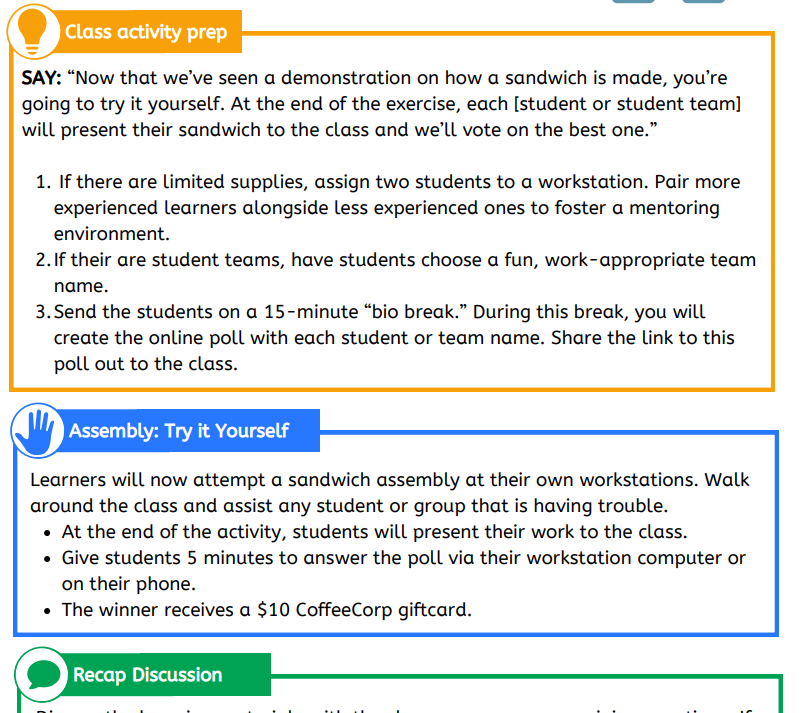
When I design Instructor-Led Training (ILT), I avoid long stretches of passive content. Videos or presentations are followed by activities or discussions that help learners connect the material to real situations and re-engage their attention. The guide also models different ways to ask questions, including open-ended Socratic prompts and direct question-and-answer formats, giving facilitators flexibility based on the group.
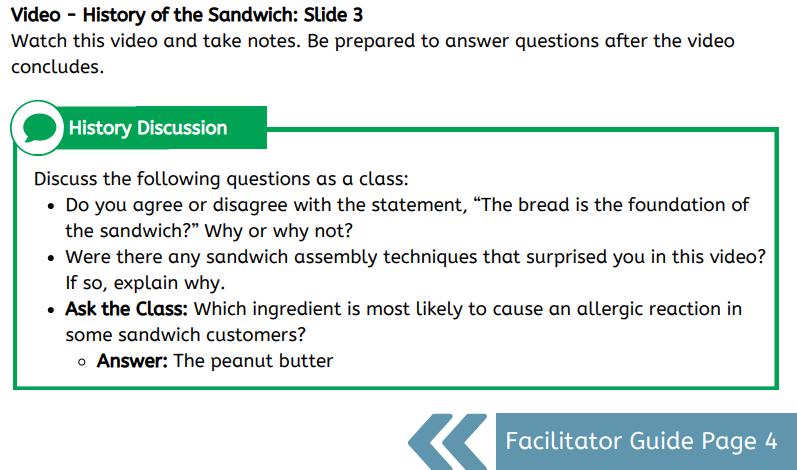
A good Facilitator Guide does more than tell facilitators what to say. It also helps them manage time, resources, and classroom variables. This guide includes clear “If/Then” guidance for common situations, such as limited equipment or different group sizes, and prompts for scheduling breaks so facilitators can support learners while handling quick administrative tasks.
Examples
The example built in GSuite is a great example of how one can create excellent and meaningful content on a shoestring budget. It has been scrubbed for any sensitive content.
This is a full example of how a course might look when built with this style of FG. Originally, both the FG and PG were built side-by-side in Adobe InDesign, which allowed us to quickly scan and copy/paste content for an exact match in the printed version. This version’s content is entirely fabricated, built off the PB&J example you see above.